Posts

Multiple UVs and LightMaps in C4D
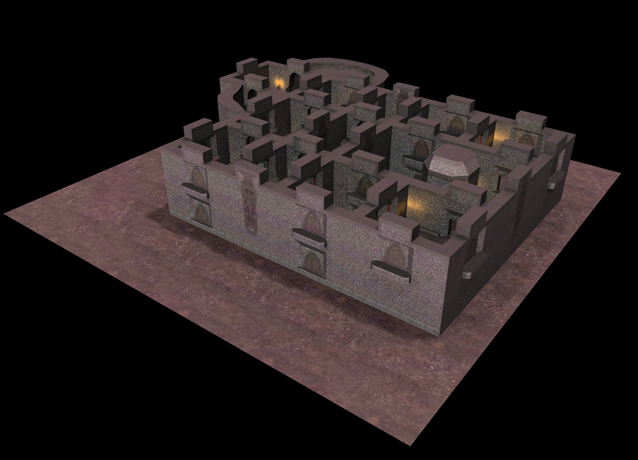
Image
This shows how to use Multiple UV sets. One set of UVs for all the diffuse textures on the objects and another set of UVs for the light map. The two materials were then blended together. The resulting scene is below. This is a Quake Level file that is imported using a custom import/export plugin that has support for multiple UV sets (mainly for the light maps).

C++ Code Generation using T4 Templates

Introduction Microsoft Visual Studio comes with a code generation tool which they call T4 Templates. It is somewhat integrated into Visual Studio but I have found the integration to be not that streamlined yet, and if your a C++ user its not there at all. So in order to show you how to use T4 Templates in your projects I am just going to explain it usage solely via the command line using the TextTransform.exe program.

Hosting a PostgreSQL Database

Introduction I recently came across a company called Heroku who offer a hosted version of PostgreSQL. Since I am looking into hosting a database I thought I would share my thoughts on what you should think about when hosting a PostgreSQL database as well as comparing a Cloud hosting provider like Rackspace against the Heroku service. What to think about when hosting a server When looking to host your database there are a number of things you need to consider (in no particular order). Location Where are your main customers. Where are your servers going to be that will be communicating with the database. Ideally you would like the database to be as close to the other servers as possible, preferably in the same building on the same network.

A C++ library for communicating with Amazon S3

Introduction Amazon web services (AWS) has many SDKs available for interacting with its services. Java Mobile Android iOS php python ruby Windows and .NET But the one that they don't support and have no SDK for is C++ . Because of the lack of an official SDK from Amazon many people have written their own C++ code for communicating with the REST api . I decided to have a quick look to see what was out there and compile a version that could be used commercially.

Experiment with Wt, Cinema4D Melange and WebGL

Image
Yesterday I decided to have a play with Wt . Wt (or Witty) is a C++ Web Toolkit which lets you write a webserver entirely in C++ without having to know anything about HTML, Javascript, HTTP or TCP/IP. I was also interested to see that they have basic support for WebGL in there and decided to give it a test drive. Not being one to make things simple I thought I would also throw Cinema4D’s Melange library into the mix to allow the export of some interesting scenes from Cinema4D and try to view them in a web browser.

Selecting a Game Engine

Before you can select your game engine you need to make a few choices. Who is my target audience? Is it PC, PS3, iPhones or anyone with a webbrowser? Then you will need to start looking for technology that you can use to develop for that platform. This may give you a number of different solutions to choose from, after which you then pick one that best suits your needs based on your skill set and requirements. The game platform(s) Before looking for the game engine you need to decide what platform (or platforms) you are going to be targeting and how you would like to deliver the MMO to your user. Firstly lets look at a few delivery mechanisms.

How to make an MMO

Introduction A lot of websites say that making a MMO by yourself is hard work. And I fully agree with each and every one of them. Creating a MMO is indeed incredibly difficult.  If you were to build an MMO yourself you will need experience in everything from 3D graphics, networking, website design, scripting engines and much much more. This is no easy task, but it is very interesting. There are many ways of developing your own MMO. You could use some of the free or commercially available engines that are already on the market (HeroEngine, Multiverse or Eclipse) but my interest is not actually in how to make the Game but more in how to make the technology behind the game and to also share that with you, my reader.

Importing Quake files and previewing levels using Irrlicht (Part 3)

Irrlicht Viewer Code Now that we have all the data loaded the next thing we want to do is open up a Irrlicht Viewer and view the scene as it will appear in any game we might make. Firstly there is the RunGameCommand. This is a bit different from the other load command because we want to run the game in its own thread. So to do this we will use Cinema4D thread. In this case we have created a new class called GameThread that is amember of the  RunGameCommand.

Importing Quake files and previewing levels using Irrlicht (Part 2)

The LoadQuake Command Firstly there is the command itself, which is not that much. This just has an execute method and of course it is registered in the main.cpp file. class LoadQuakeCommandData : public CommandData { public:    virtual Bool Execute(BaseDocument* doc); }; Bool RegisterQuakeLoaderCommandData() { //Note that I should really get another ID from the maxon plugin cafe here rather than go + 1   return RegisterCommandPlugin(ID_RUNGAME_CMD+1, "LoadQuake", 0, "", "LoadQuake", gNew LoadQuakeCommandData()); }

Importing Quake files and previewing levels using Irrlicht (Part 1)

Image
Introduction This tutorial will show you how to use the Irrlicht graphics engine to load quake levels into Cinema4D (including the mesh, materials and textures) and then export that back out again to the Irrlicht graphics engine to preview how your game level will look. You will learn about creating polygon objects, materials and textures in Cinema4D and how to access the data again for exporting.

Creating a renderer using a video post plugin

Introduction In this tutorial we will be setting up the basic framework for rendering images to the viewport in Cinema4D. And to test this we will be creating a VideoPost plugin that will add a new renderer, our renderer, to the list of available renderers in Cinema4D. We will then set the renderer to simply color the entire viewport red. Before we begin make sure you have Visual Studio C++ Express Edition and Cinema4D 11.5 installed. If you do not have these tools setup then I suggest you follow through this tutorial to get your development environment setup .

RakNet and Cinema4D Part 1: Connecting 2 players

Introduction This tutorial will demonstrate how to connect 2 or more copies of Cinema4D together and let each copy of Cinema4D have its own "player" cube object that they can move around in the scene. All other copies of Cinema4D that are also connected will also see the cube moving around the screen. This could be thought of as a very simple Multiplayer room where the each Cinema4D user has a cube as their "avatar" that they can move around the world. This tutorial will use Visual Studio 2008 C++ Express Edition, Cinema4D 11.5 and RakNet for the Game Networking Engine. If you want to know more then just read on...